


Geozilla - Family GPS Locator
4.23.18K Reviews
App Specs
- Version
- Varies with Device
- Updated On
- License
- Free
- Downloads
- 10,000,000+
- Developer
- GZ TECH
- Categories
- Lifestyle
- Platform
- Android, iOS
Screenshots


 Analysis by AppCompare
I find family-location apps most useful when they answer a small, practical question without turning every trip into a check-in: has someone arrived, or should I wait before setting off? Geozilla - Family GPS Locator is built around that kind of shared awareness. It is a free lifestyle app from GZ TECH, available for Android and iOS, with a 4.2 average from around 601,000 ratings and over 10 million installs. I’d think of it as a tool for families who agree to share locations, not as a way to monitor someone who has not chosen to participate.
Keep Your Family Safe and Connected
First things first, the whole idea behind Geozilla is peace of mind. It’s designed to help you track the whereabouts of your family members in real-time. Now, I know what you’re thinking—"Is this just another surveillance tool?" But honestly, it’s more about safety and staying connected in our crazy, busy lives.
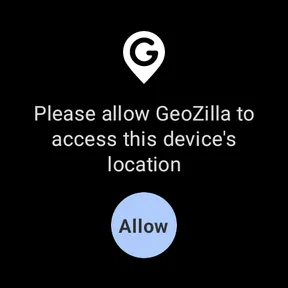
Once you download the app, which is available for both Android and iOS, setting it up is a breeze. You create a group, invite your family members, and boom, you’re all linked up on a private map. The interface is pretty intuitive, so even if you’re not super tech-savvy, you’ll get the hang of it quickly.
That simple group setup is also where I’d pause and agree on expectations. Everyone should know who is in the group, what location sharing is for, and when it is reasonable to check the map. A family app feels more comfortable when it supports coordination rather than constant scrutiny. For teenagers, for example, a clear conversation about sharing on the way home is more useful than treating every location update as a report that needs explaining.
Features That Stand Out
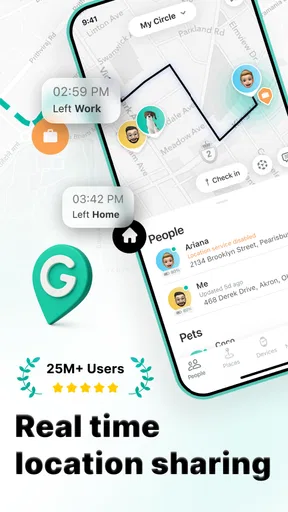
Now, let’s dive into some features that really caught my eye. One of the coolest things is the real-time location sharing. You can see where your family members are at any given moment. Perfect for when you’re waiting for your kid to get home from school or wondering if your partner is stuck in traffic.
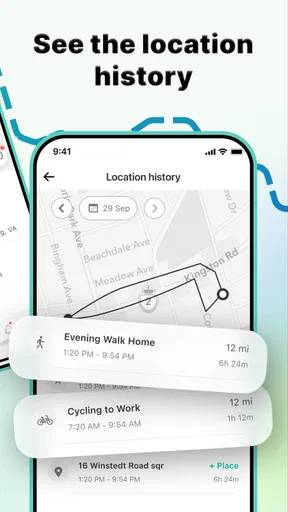
Another feature I found super useful is the location history. It allows you to see where your family members have been over the past few days. It’s not just about spying, but more about understanding their routines, which can be reassuring.
Oh, and the geofencing feature is a lifesaver! You can set up safe zones like home, school, or work, and get notified when someone arrives or leaves. It’s like having a digital guardian angel watching over your loved ones.
Worth Reading Before You Choose

Flipboard Shows What News Apps Must Do Beyond the Feed

Switching to Android Auto Means Rethinking Your Driving Routine

Google Calendar Makes a Crowded Week Easier to Manage

Ludo King Makes the Most of the Minutes Between Plans

Baby Panda World Brings Quick Play to Modern Phones, but Its Game Library Feels Busy

ESPN’s Live Game View Makes Following Close Games Easier
For everyday use, I’d keep the map focused on a few places that genuinely matter, such as home and a regular pickup point. Too many zones can turn helpful arrival and departure notices into background noise, making it easier to miss the alert you actually care about. Before relying on a zone for a time-sensitive pickup, try it during an ordinary trip and see whether the notification arrives in a way that works for your routine.
A useful way to handle location history is to treat it as context, not proof. A map can help explain why someone took longer to get home or whether a familiar trip has ended, but it cannot tell you what happened along the way. If a location looks unexpected, I’d ask first rather than drawing conclusions from a dot or route alone. That keeps the feature helpful without asking it to answer questions it cannot answer.
Easy on the Battery
One of my initial worries was if constant location tracking would drain my phone’s battery. But guess what? The app is optimized for battery efficiency. It uses smart algorithms to update locations without sucking the life out of your phone. Kudos to the developers for making sure we’re not tethered to our chargers all day!
Location tools still depend on the phone they are running on, so I wouldn’t treat any map as a guaranteed live view every second. If someone’s position seems stale, the first useful check is whether their phone is powered on, has a working connection, and can provide its current location. It can also help to open the app on that person’s device and confirm they are still sharing with the right group. These are sensible checks before assuming the app itself has failed.
Battery concerns are worth discussing as a household rather than dismissing. If a family member is already careful about battery use, agree on when location sharing is useful and keep the phone charged before a long day out. For a one-off outing, decide on a simple backup plan too—such as a text or call if plans change—so nobody depends entirely on a location update.
Privacy Concerns? Don’t Sweat It
I know privacy is a big deal for most of us, and it should be. Luckily, with Geozilla, everything is encrypted and private. The app ensures that only the people in your group can see your location. Plus, you can easily toggle the location sharing feature on and off, giving you control over your privacy.
Even with a private family group, it’s sensible to review membership whenever circumstances change. If a person no longer needs to be included, check the group rather than assuming old invitations will take care of themselves. I also wouldn’t add friends, relatives, or caregivers casually; location access is personal, and everyone should understand what sharing means before joining.
There is a trade-off in switching sharing off: relatives may no longer be able to use the map to coordinate an arrival or pickup. That is not a reason to leave it on against someone’s wishes. It is a reason to agree on a straightforward alternative for times when sharing is paused, such as sending a message when plans change.
Communication Made Easy
Another neat addition is the built-in messaging feature. You can chat with your family members directly within the app, making it easier to coordinate meetups or just check in. It’s like having a group chat with a map!
Plus, there are cool little extras like the ability to share photos and notes, adding a personal touch to your interactions. It’s not just about tracking, but also about enhancing communication within the family.
In a busy household, combining a map with a quick message can prevent unnecessary calls: one person can say they are on the way while another checks the shared location. I’d still use whichever communication method the family reliably notices. If one member rarely opens the app, a message there may not be the best way to handle an urgent change, so agree on a fallback channel rather than assuming everyone sees updates immediately.
Where Setup and Alerts Can Get Tricky
The first friction point is not usually the map itself; it is getting every family member into the same routine. One person may join the group but forget to keep sharing enabled, while another may expect the app to show a position even when their phone is offline. I’d set it up together, check that each invited person can see the intended group, and test a normal arrival notification before relying on it for school pickup or a meeting point.
If an alert does not arrive, avoid changing several settings at once. Confirm the place is saved as the intended zone, check that the relevant person is sharing with the group, and then try a later routine trip. A single test gives you a clearer answer than repeatedly adjusting settings without knowing which change helped. For important plans, a direct message remains the safer backup.
One realistic example: on a rainy afternoon, I might check whether a family member is nearing the usual pickup area before walking outside. If the location has not refreshed, I would send a short message rather than keep watching the map. The app can reduce uncertainty, but it cannot make a delayed update equivalent to a conversation.
When a Different Approach Makes More Sense
Compared with a basic messaging app, Geozilla’s appeal is that location and coordination sit together: the group can use the map, location history, zones, and messages instead of relying only on “I’m here” texts. That can be convenient for households with recurring trips or several people coordinating pickups. A simple group chat is still the better choice if the family only needs occasional check-ins and does not want ongoing location sharing.
It is also not the right fit for someone seeking a private navigation tool for their own trips, or for a household where members do not freely agree to share locations. A map-based family app works best when participation is mutual and the purpose is clear. If trust is the central problem, tracking is unlikely to solve it; an honest conversation is the better starting point.
Geozilla is free to download, with in-app purchases ranging from $2.99 to $89.99 per item. I’d check the purchase screen carefully before choosing anything, especially if you are setting it up for a whole family and want to know what is included without paying. The app is rated for Everyone, though parents should still make their own decision about whether location sharing is appropriate for their child and family circumstances.
My Practical Verdict
All in all, my experience with Geozilla - Family GPS Locator has been pretty positive. It’s more than just a tracker; it’s a tool for enhancing family safety and connectivity. Whether you’re a parent keeping an eye on your kiddos or a partner wanting to make sure your loved one is safe, this app has got you covered.
I’d recommend it most to families who have a recurring reason to coordinate—school journeys, shared errands, or meeting up after separate plans—and who are comfortable making location sharing a mutual choice. I would skip it if you only need occasional messages, if location visibility would create more anxiety than reassurance, or if the group cannot agree on respectful boundaries. Its strongest use is reducing small uncertainties, not replacing trust or conversation.
If you’re interested in giving it a whirl, you can easily find it on the Play Store or App Store. Just download it, invite your family, and start enjoying the peace of mind that comes with knowing your loved ones are safe and sound. Trust me, it’s worth checking out!
Pros
- Real-time location updates enhance safety.
- User-friendly interface with intuitive design.
- Low battery usage compared to similar apps.
- Customizable alerts for specific locations.
- Works seamlessly across multiple devices.
Cons
- Occasional location inaccuracies reported.
- Premium features require a subscription.
- Limited customer support response time.
- Some users report app crashes occasionally.
- Notifications can be delayed sometimes.
FAQs for Geozilla - Family GPS Locator
Is Geozilla - Family GPS Locator free to use?
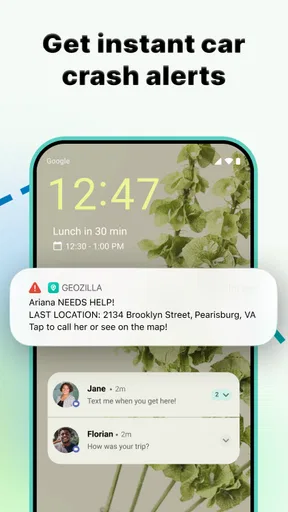
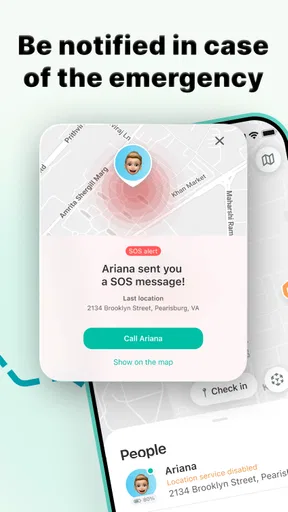
Geozilla offers a free version with basic features, allowing users to track family members' locations and receive limited notifications. However, to access premium features such as location history, SOS alerts, and driving reports, users need to subscribe to the premium version. Pricing details can vary, so it's advisable to check the app store for the latest subscription plans.
How accurate is the location tracking in Geozilla?
Geozilla uses GPS technology to provide real-time location tracking. The accuracy largely depends on several factors including the device's GPS capabilities, internet connection, and environmental conditions. In most situations, it offers precise tracking within a few meters, but rural or densely built areas might affect the precision.
Can I track my family members without them knowing?
No, Geozilla prioritizes privacy and requires consent from all parties being tracked. Every user must install the app on their device and agree to share their location. This ensures transparency and maintains trust among family members while using the app’s features.
What happens if a family member's phone runs out of battery?
If a family member's phone battery dies, Geozilla will not be able to update their location in real-time. However, the app notifies other users when a phone's battery level is low, allowing them to remind the user to charge their device beforehand, minimizing disruptions in location tracking.
Does Geozilla work internationally?
Yes, Geozilla functions globally as long as there is an internet connection available. It supports tracking across different countries, making it ideal for families traveling abroad. Users should be aware that data roaming charges may apply when using the app outside their home country.


